
Console Walkthrough
Capabilities
Explore advanced modules and request expert implementation help.
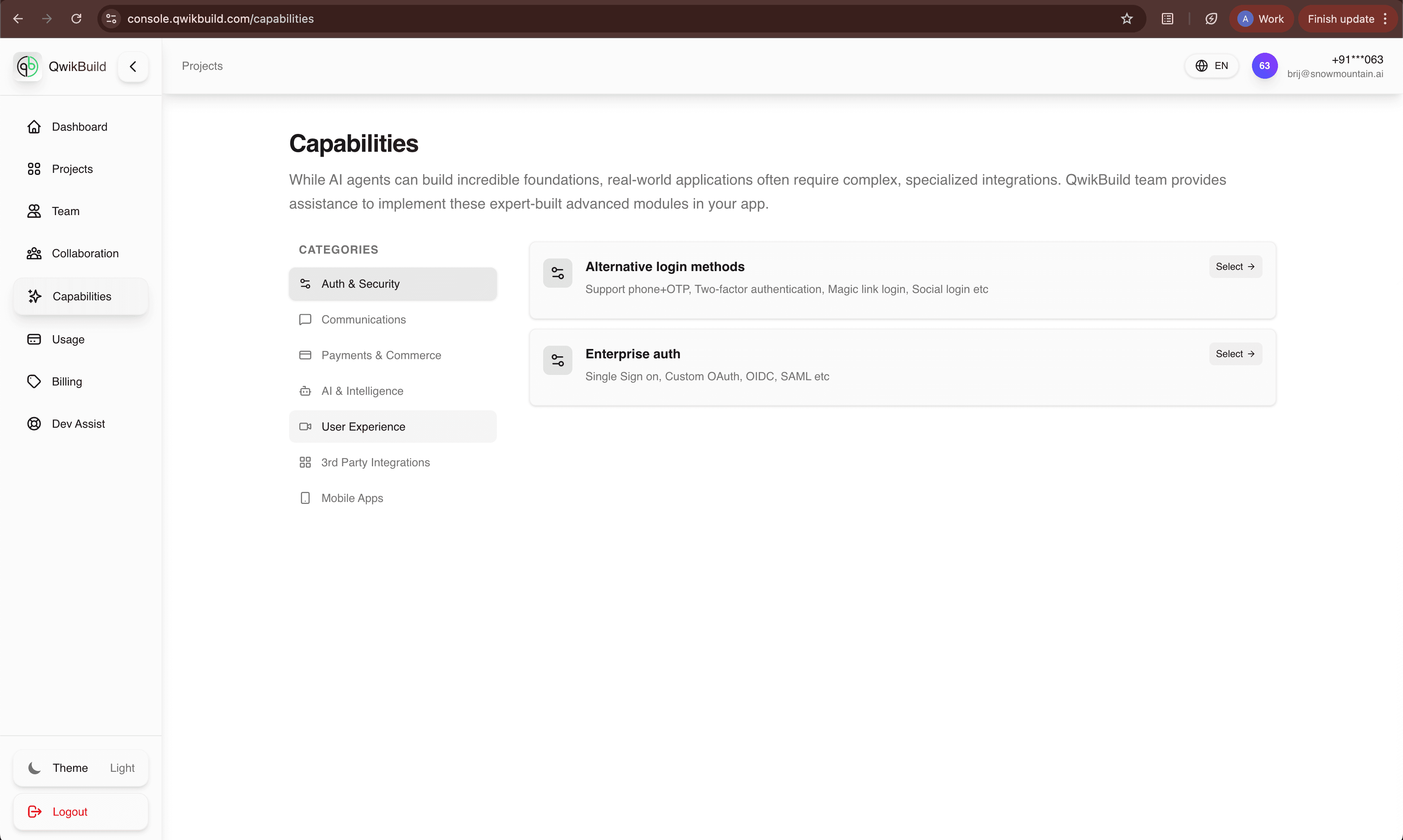
Capabilities is where you discover advanced modules that go beyond a basic app build, such as auth, AI, integrations, and commerce features.
What You See On This Page
- Category list (Auth, Communications, Payments, AI, UX, Integrations, Mobile)
- Capability cards for each category
- Select action to express implementation interest
Why This Page Matters
- Helps non-technical users translate business needs into product modules.
- Makes advanced features discoverable without technical research.
- Connects feature intent to Dev Assist support workflows.
How To Choose A Capability
- Start with your business goal (example: "accept payments online").
- Open the closest category.
- Read capability descriptions and "You bring" requirements.
- Click Select on the most relevant option.
Example Mapping (Business Need -> Capability)
- "Single sign-on for my company users" -> Enterprise auth
- "Accept subscriptions" -> Payments & Commerce
- "Add in-app AI assistant" -> AI & Intelligence
- "Connect CRM or external tools" -> 3rd Party Integrations
Best Practices
- Prioritize one high-impact capability at a time.
- Confirm prerequisites before requesting implementation.
- Use Dev Assist for custom architecture questions.