
Console Walkthrough
Collaboration
Track shared activity, project momentum, and team updates.
*Feature Currently Under Development
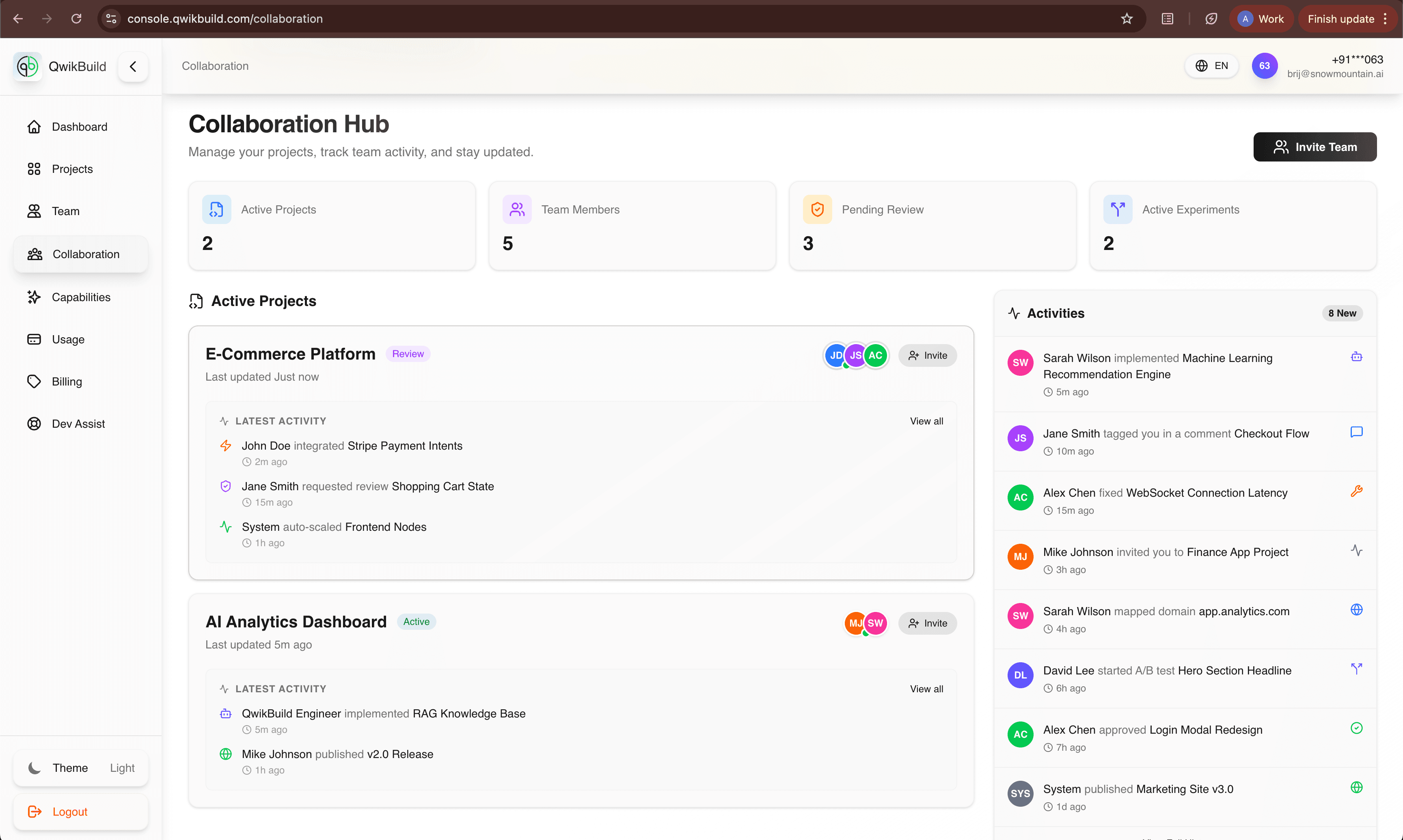
The Collaboration tab provides a shared team activity view so everyone can stay aligned without checking code or technical logs.
What You See On This Page
- Collaboration Hub header
- Project and team activity metrics
- Active project feed
- Recent activity timeline
- Invite Team actions
What This Helps You Do
- See work in motion across projects.
- Identify pending reviews and active tasks.
- Understand who changed what, and when.
- Keep managers and builders aligned.
Common Workflows
Monitor current team momentum
- Open Collaboration.
- Review top metrics (projects, members, reviews, experiments).
- Scan active project cards for latest changes.
Spot blockers early
- Look for repeated pending/review activity.
- Open the related project.
- Create a Dev Assist request if resolution is not clear.
Invite contributors
- Use Invite Team near project/activity context.
- Add collaborators to speed up delivery.
Important Note
If you see a "feature under development" banner, treat the page as progressive functionality: use it for visibility, and rely on project pages for final execution details.
Best Practices
- Use this tab during standups and weekly reviews.
- Pair activity signals with project status before making decisions.