
Console WalkthroughProjects
Security
Run full security and malware audits on your project dependencies and review scan results in one place.
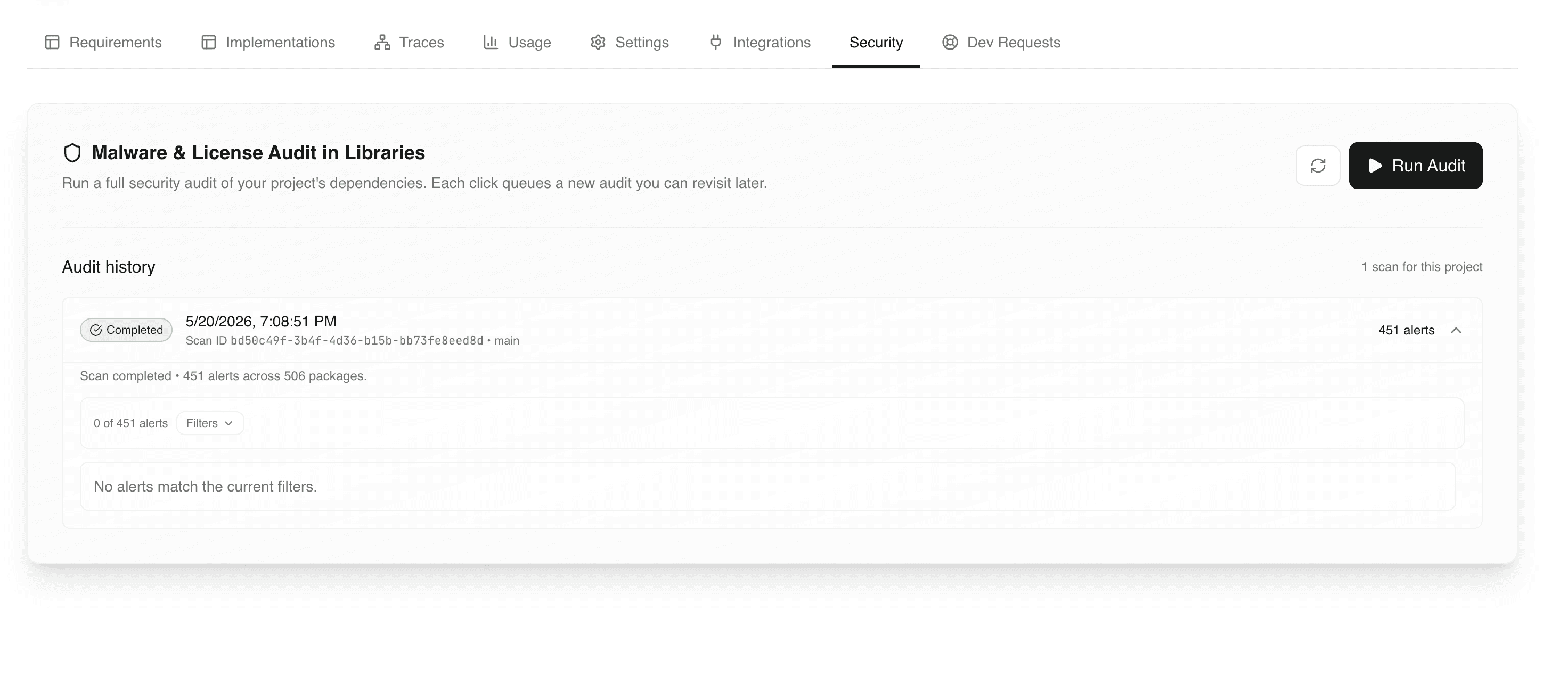
The Security tab runs a complete security and malware audit on your project's dependencies. Use it to verify that the libraries powering your app are safe, license-compliant, and free of supply chain risks before release.
What You See Here
- Run Audit action to start a fresh full scan
- Audit history showing previous scans with timestamps and status
- Each scan entry displays:
- scan completion status
- scan ID and target branch
- total number of alerts found
- number of packages analyzed
- Filterable alert list per scan
What A Full Audit Covers
A full audit scans every direct and transitive dependency in your project and checks for:
- Known malware packages
- Supply chain risks (typosquats, install scripts, obfuscated code)
- Critical vulnerabilities (CVEs)
- License compliance issues
- Native code, telemetry, and shell script overrides
- Mutable or untrusted dependency sources
- Protestware and risky package behavior
Alert Severity
Alerts are grouped by severity to help you triage faster:
- Critical: Immediate risk such as known malware or active supply chain compromise.
- High: Serious vulnerabilities or unsafe behavior that should be fixed before release.
- Medium: Potential risks that should be reviewed but may be acceptable.
- Low: Informational issues such as license notices or minor maintenance flags.
Typical Workflow
- Open the project and go to the Security tab.
- Click Run Audit to start a full dependency scan.
- Wait for the scan to complete (a new entry appears in Audit history).
- Expand the entry to view alerts grouped by severity.
- Filter alerts to focus on the most critical issues first.
- If a fix is required, request the change in AgentQ Chat or escalate via Dev Requests.
When To Run An Audit
- Before promoting a project from Development to Production.
- After adding new features that introduce additional dependencies.
- Before sharing the deployed app with end users.
- Periodically for live projects to catch newly disclosed risks.
Best Practices
- Run an audit before every major release.
- Resolve Critical and High alerts before going live.
- Keep a record of acknowledged alerts to avoid repeated reviews.
- Pair audit reviews with Launch Readiness Checklist.
Common Issues
- High alert count on first scan: expected for large dependency trees; focus on Critical and High first.
- No alerts match the current filters: adjust filters or clear them to see the full list.
- Stale audit results: re-run the audit after any dependency or feature change.